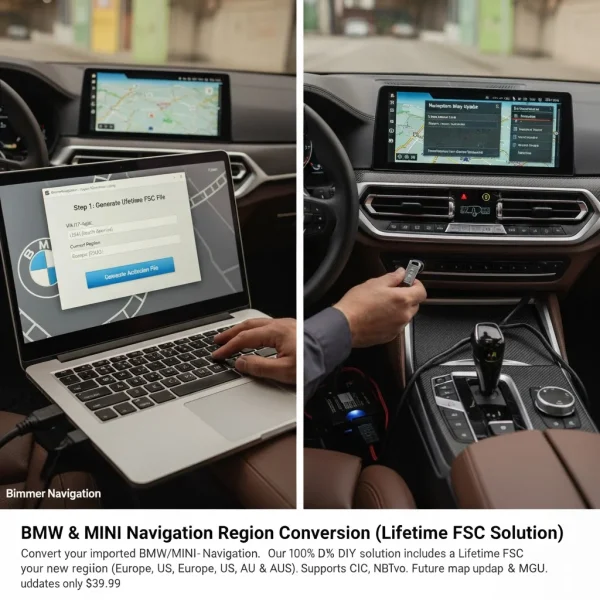
BMW Navigation Region Conversion | 100% DIY (All Systems)
- Same OEM files as the dealer
- FSC code generated per VIN within 1 hour
- Step-by-step PDF guide in every order
- Lifetime WhatsApp support included
Description
iDrive Navigation Map Region Conversion Software Delivery: 100% DIY via Email (Software, Code & Instructions) Benefit: Permanent, One-Time Solution (Lifetime FSC).
Finally, Make Your Imported BMW Feel Like Home.
It’s a real problem when you import your dream BMW or MINI, only to find the Navigation system is stuck in another country. A car this high-tech shouldn’t have a map screen that’s basically useless. In the past, the only way to fix this was to physically remove the iDrive unit and send it off to a workshop, especially for the newer MGU (iDrive 7/8) systems. It was costly, risky, and a total hassle.
Those days are behind us! Bimmer Navigation is here with the ultimate, official solution. Say goodbye to the stress of workshops and the hassle of scheduling complicated technician sessions. We’re excited to offer a groundbreaking, 100% Do-It-Yourself (DIY) Region Conversion Solution that gets delivered straight to your inbox. This is a one-time purchase that will permanently convert your car. Plus, our service includes a Lifetime FSC Activation for your new region. In the future, all you’ll need are the map data files, which you can snag from us for just $39.99.
How to Order (3 Simple Steps):
- Select Your Current Region: Use the dropdown menu to pick the region currently set up in your car (like North America, Europe, or the Middle East).
- Select Your Target Region: Choose the new region you want to switch to (such as Europe, North America, Australia & New Zeeland, South America or others).
- Select Your Navigation System: Pick your iDrive head unit from the list (like MGU, NBTevo, NBT, or CIC).
Once you’ve added everything to your cart, don’t forget to provide your 17-digit VIN at checkout. Our team will use your VIN to ensure your selections are spot on and to create the exact, genuine files tailored for your specific car.
Not sure which system you’ve got?
If you’re stuck on Step 3, this is easy to find.
- In your car, go to the Main Menu and select “Navigation“.
- Go to the “Settings” menu (or press the “Options” button on your controller).
- Scroll down and select “Navigation System Version“.
The map name tells you everything:
MGU: “Road Map… LIVE” or “WAY”
NBTevo: “Road Map… EVO”
NBT: “Road Map… NEXT”
CIC: “Road Map… PREMIUM”, “MOVE”, or “MOTION
The DIY Process: You’re in Control:
We’ll provide you with a complete digital package that’s safe and tailored just for your system.
For MGU (LIVE/WAY) Headunit:
What you’ll need: A Windows 10/11 laptop, an ENET Cable, and a USB stick (64GB FAT32).
The Process: Start by running our “Feature Installer” app on your laptop to set up your car and get your unique activation file. After that, load the new maps that we send you and that activation file onto your USB, plug it into your car, and you’re good to go!
FOR CIC (PREMIUM), NBT headunit cars:
What you’ll need: Just a USB stick (64GB FAT32).
The Process: We’ll send you an email with the map download link and a unique Lifetime Activation Code. Simply copy the map files to your USB, plug it in, and enter the code when your iDrive prompts you.
For NBT EVO (EVO ID4, EVO ID5/6 headunit:
The process is pretty straightforward. Most vehicles can handle the region change entirely through a USB connection.
What you’ll need: Just a USB stick (64GB FAT32).
The Process: We’ll send you an email with a link to download the map, along with a unique Lifetime Activation Code. Just copy the map files onto your USB, plug it into your car, and enter the code when prompted.
Note: Some NBT Evo headunit cars with certain firmware versions might need a minimum Windows laptop or Mac and an ENET cable. We’ll check your VIN to make sure you get the best and fully compatible method for your car.
What We Need From You:
Please have your 17-digit VIN ready at checkout.
Required Hardware: You’ll need a64gb Fat32 USB Stick (for all orders) and make sure you have a Windows Laptop along with an ENET Cable on hand, just in case. Since this is a digital service specifically designed for your car, it’s non-refundable.
FAQ’s:
Q: You say “no remote session,” but what if I get stuck?
A: When we say “no remote session,” we mean our product is designed for you to handle everything on your own, without needing to schedule an appointment. But don’t worry—we’re here for you! Our support team is ready to assist via email and live chat if you have any questions.
Q: Other sites say MGU needs a remote session. How is yours different?
A: We’ve created a unique, automated app that takes care of the heavy lifting for you. Instead of a technician running complicated scripts, our user-friendly “Feature Installer” manages the technical stuff, allowing you to do it all at your own pace.
Q: What if I order for the wrong iDrive system?
A: No need to stress! Our team double-checks every order against the VIN you provide. If we spot a mismatch (like if you selected “NBT” but your car actually has “MGU”), we’ll reach out via email to sort it out before sending any files.
Q: Will my MyBMW App or Connected Drive still work?
A: Great question! Online services like the My BMW App, Remote View, and the eCall/SOS button are linked to your car’s original country through its built-in SIM card. These can’t be changed, as they’re managed by BMW’s main servers. Our service focuses on your in-car navigation maps, which will function perfectly.
Q: What about dealer visits? Will they break this?
A: Your conversion is completely safe for all regular dealer service and maintenance. The only thing to watch out for is if they perform a full iDrive software update, which would reset the car to its original settings. We recommend telling your service advisor, “Please don’t update the iDrive software during routine maintenance.”
Q: How do I get future map updates after this?
A: Here’s the best part! Your car is now permanently converted. Our solution includes a Lifetime FSC activation, ensuring you’ll have access to future map updates without any hassle.
Additional information
| Delivery Method | Online Download, USB Shipment |
|---|---|
| Current Installed Region | North America, Australia / New Zealand, Europe, Middle East, South America, Southeast Asia, Turkey, Israel, Russia, North Africa, South Africa, Argentina |
| Target Region | North America, Australia / New Zealand, Europe, Middle East, South America, Southeast Asia, Turkey, Israel, Russia, North Africa, South Africa, Argentina |
| Navigation System | CIC (PREMIUM, MOVE, MOTION, ROUTE), NBT (NEXT), NBT EVO, MGU (LIVE, JOY, WAY / EntryNav2) |

Reviews
There are no reviews yet.